
What to do if your phone is lost or seized
Prepare ahead, then follow a calm checklist if your phone is lost, stolen or taken from you.
Most of the work is done before anything happens. Prepare now, and the day it happens will be much less stressful.
Part 1: Prepare in advance
- Use a strong passphrase, not a short PIN or a fingerprint. A passphrase protects you far more if someone has your phone. Biometrics can be forced on you; a passphrase in your head cannot.
- Keep the phone updated. Updates fix the holes that forensic tools use.
- Restart the phone when you are in a risky place. After a restart the phone is in its most protected state (called "Before First Unlock").
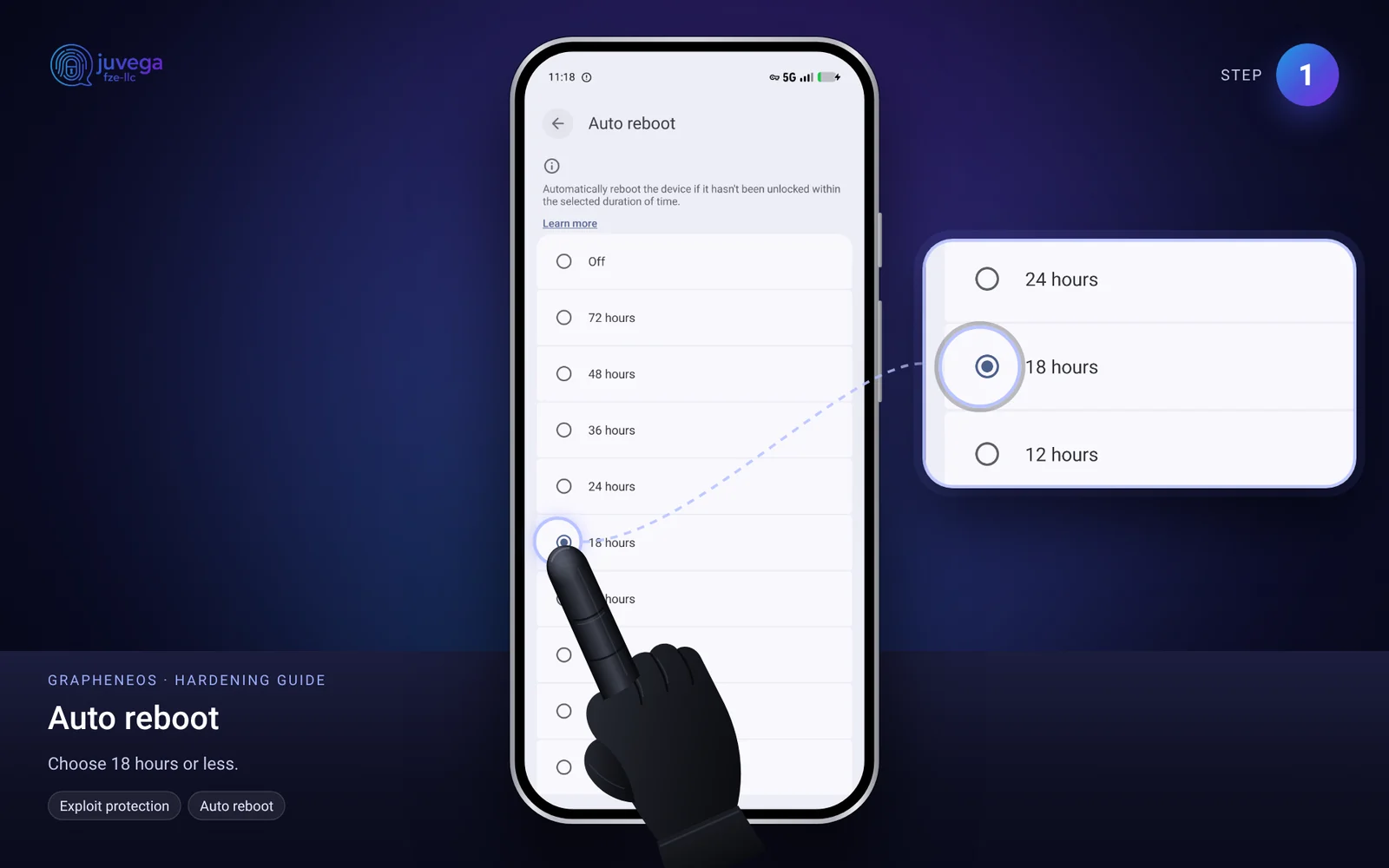
- Set the auto-reboot timer in Settings > Security and privacy > Exploit protection > Auto reboot. A shorter time is safer.
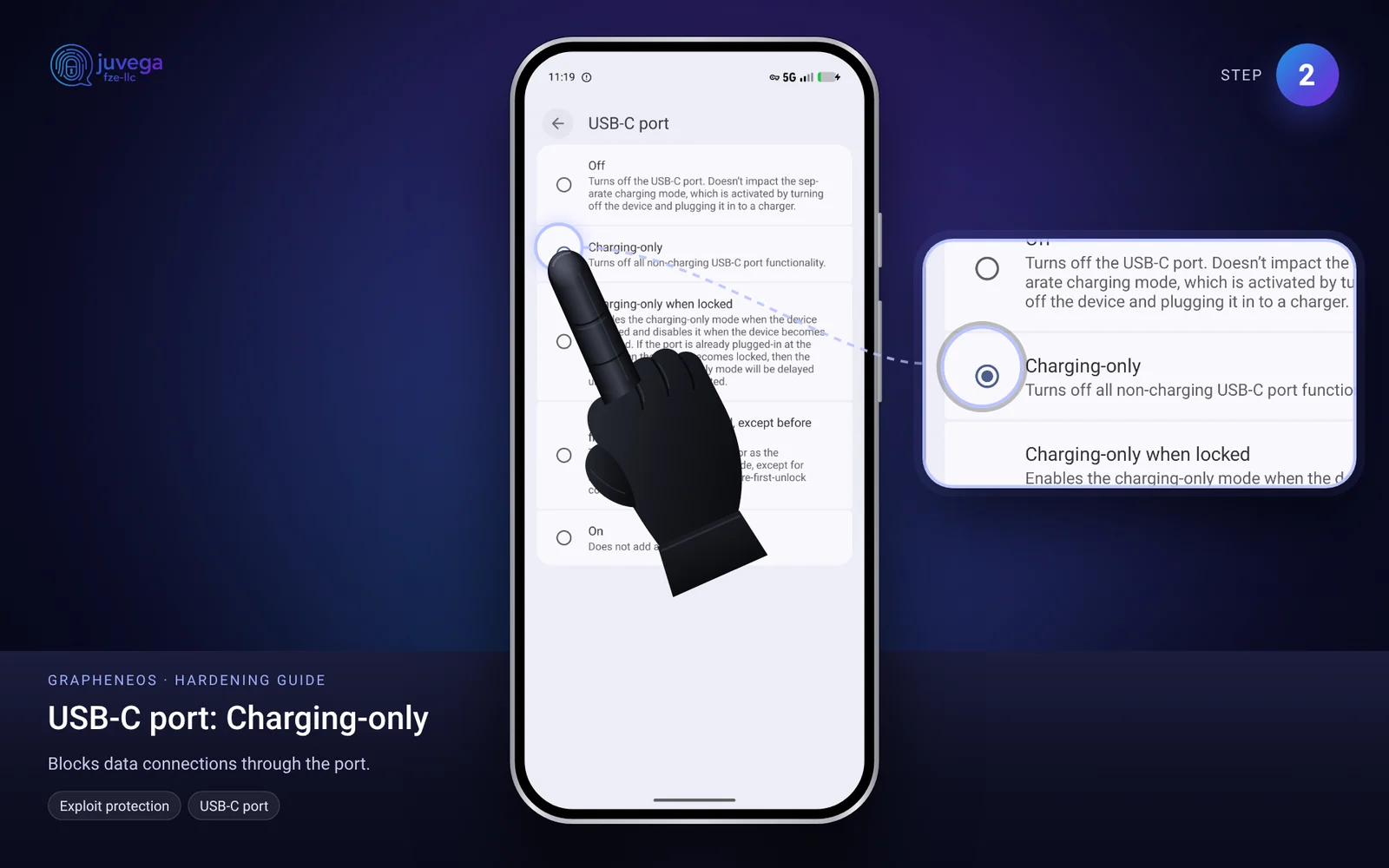
- Turn off USB data when locked: GrapheneOS has the setting "USB-C port" > "Charging-only when locked".
- Back up regularly to a Cryptomator vault. See how to back up your GrapheneOS phone.
- Use 2FA with backups and recovery codes, see Aegis.
- Keep little on the phone. Use a separate profile for sensitive things (profiles guide) and sign out of it when not in use.
- Write down your phone model and IMEI and keep the note somewhere safe.
- Know what a duress feature does. GrapheneOS has a PIN that wipes the phone, which can help in some situations but can also be illegal to use when you are ordered to hand over the data. Think carefully before you use it.
Part 1b: Set up Oblivion so a wipe can happen for you
Oblivion is a free app that can lock or factory reset your phone when a trigger fires. Full steps are in how to use Oblivion. These are the settings that matter for a lost or taken phone, and what each one protects:
- Panic button (Quick Settings tile). One tap locks or wipes the phone. Use it if you still hold the phone and feel it is about to be taken. It does nothing once someone else has it in their hands.
- Secret remote message. You send a long secret code to the phone from another device and it wipes itself. This protects a lost or stolen phone, but only while the phone is on and has a signal. A thief who turns it off, puts it in a foil bag or removes the SIM stops it.
- Dead man's switch (inactivity timer). If the phone has not been unlocked for the time you set, it locks or wipes. This is the only trigger that works when the phone is out of your hands and offline. Set the time to something you can live with, for example a few days. Too short and you may wipe your own phone while on a trip.
- Lock or wipe? "Lock only" is safer against mistakes. "Lock and wipe" gives the strongest protection, because a wiped phone has nothing left to read. A wipe cannot be undone, so only turn it on once your backups work (see Part 4).
- Protect the settings with an app lock, and keep the remote code written down offline, never on the phone.
What Oblivion cannot do:
- It cannot protect a phone that is switched off, in Safe Mode, or that someone has already unlocked.
- It does not replace a strong passphrase and automatic reboot. These stay your first line of defence.
- A wipe that you trigger after the police or border staff have told you to hand over the phone may be treated as destroying evidence, and can be a crime in some places. Use the panic button for theft and loss, and think carefully before using it in front of officials.
Part 2: If your phone is lost or stolen
- Stay calm. Do not panic-buy a new phone first.
- Send your Oblivion remote code (lock or wipe) if you set that up, and lock it from another device you control.
- Call your mobile provider and ask them to block the SIM or eSIM. If you use an anonymous eSIM, you can ignore this, but make sure nothing important depended on that number.
- Change passwords in this order: email, password manager, banks and wallets, then social accounts. Use a different device.
- Remove the phone from your accounts' trusted devices list.
- Check 2FA. If your codes were in Aegis, restore from your backup on the new phone.
- Move your crypto to a new wallet if your seed phrase was ever on the phone (unencrypted).
- Tell people who might get odd messages from you, using a different device.
- Report it to the police if you need a report for insurance.
Part 3: If your phone is taken (border, police, theft by force)
This is general information, not legal advice. Laws differ greatly between countries. Speak to a lawyer you trust.
- Stay calm and polite. Do not resist physically.
- Ask what the legal basis is and ask for a written record of what was taken.
- You can say you wish to speak to a lawyer before answering questions. In many places you have this right.
- Do not lie. Lying can be a crime on its own. Saying "I do not wish to answer" is different from lying.
- Do not hand over passwords unless the law in that country requires it and you have been advised. In some countries the law can force you to unlock a device; in others it cannot. Know the rule for places you travel to.
- Afterwards, assume the phone is compromised. Do not use it again. Change passwords from a clean device. Treat everything on it as read.
Part 4: Travelling
The safest phone to take across a border is a phone with almost nothing on it. You can do this with your own phone:
- Encrypt the files you care about with PGP first. See how to use PGP to encrypt files. This adds a second lock, so a stolen vault is still not readable.
- Put the encrypted files in a Cryptomator vault and upload it to your storage. See how to set up Cryptomator.
- Check the upload. On another device or profile, open the vault and open a few files. Do not continue until this works.
- Delete the profile (or the files) that held the data. See profiles. A deleted GrapheneOS profile removes its data. Keep your Oblivion settings on.
- Travel with the clean phone. If it is searched, there is nothing of yours to find.
- Once you reach your destination, connect through a VPN, open Cryptomator, download the vault, then decrypt the files with your PGP key.
- Keep the passphrases in your head or in a place that is not on the phone and not in your bag. Never carry the PGP private key in a place that gets searched.
- Do not wait until the day you travel. Do a full practice run first, and allow time for large files to upload.
Remember that being unable to show data you normally have may also draw questions, and some countries require you to unlock devices. Check the rules for your route before you go.
Quick checklist
- Passphrase, updates, auto reboot.
- Backups and recovery codes ready.
- Lost: lock, block SIM, change passwords.
- Oblivion: dead man's switch on, panic tile ready, remote code written down.
- Travelling: PGP, then Cryptomator, delete the profile, restore at destination.
- Seized: stay calm, ask for a lawyer, assume compromise.
Comments
Loading comments…